phyphox
- 4.8
- Rating
- 1.00M
- Installs
- Free
- Price

 Analysis by App-foxy
Some educational apps explain physics with diagrams, while phyphox lets me turn the phone already in my hand into a small experiment tool. That difference matters. I can investigate motion, sound, light, vibration, and other physical effects by working with the sensors built into a mobile device, rather than only reading an explanation or watching a demonstration. It feels closer to a practical lab notebook than a conventional lesson app.
Developed by RWTH Aachen University, this free education app is aimed at curious students, teachers, hobbyists, and anyone who enjoys testing an idea instead of accepting it on faith. Its average rating is 4.8 from around 8,400 ratings, and it has passed one million installs. Those figures suggest that it has reached well beyond a narrow university audience, but the experience still rewards patience and a willingness to think about measurement quality.
Why this physics app earns trust through hands-on work
My first impression is that phyphox is most valuable when I treat it as an instrument, not as a collection of flashy demonstrations. The phone does not magically replace a laboratory. Instead, it gives me a practical way to collect observations and connect them with physics concepts. That distinction makes the app more trustworthy: the result comes from a visible measurement process that I can repeat, question, and compare.
You May Also Like

 Blood Strike: 2.5 Anniversary
Blood Strike’s Loadouts Turn Every Drop Into a Tactical Gamble
A close look at Blood Strike’s custom loadouts: how fast access to signature weapons reshapes its battle royale rhythm, rewards preparation, and narrows the gap between fights.

 Pandora - Music & Podcasts
Pandora’s Music Is Easy to Start, but Harder to Recover
Pandora’s strength is its low-effort path from a seed to a station. Its weak spot is how much confidence it asks you to place in connection, setup, and quiet recovery.

 8 Ball Pool
 Is Built on Rivalries, Rematches, and Routine
A close look at the rivalries, rematches, shared routines, and unanswered safety questions that turn a quick pool match into a persistent mobile community.

 Samsung Music
’s Quiet Strength Is Playing What You Already Own
Its reach comes less from spectacle than from dependable access to a personal library. That simplicity is both the app’s strongest retention engine and its ceiling.

 AccuWeather: Weather Radar
AccuWeather Review: A Quick, Clear Forecast for Everyday Decisions
For everyday plans, the best forecast is the one you can understand quickly. AccuWeather makes rain timing, radar, and local conditions easy to act on, with a few trade-offs.

 Hill Climb Racing
Why Hill Climb Racing Still Turns Crashes Into One More Run
A tiny car, a bumpy hill and one more upgrade: Hill Climb Racing keeps resurfacing because its simple chaos makes every near-miss feel personal.
More From Our News Desk



The app comes from an academic developer rather than a general entertainment publisher, which fits its purpose. It is listed as suitable for Everyone, is free to use, and supports devices running Android 5.0 or later. The current version is 1.2.0. These details make it approachable for older phones and for classrooms where not every student has the newest hardware.
At the same time, a phone sensor has limits. The phone may be resting at an angle, moving slightly, affected by a case, or influenced by nearby noise and vibration. A graph can look precise even when the setup is poor. I therefore trust the app most when I use it to explore patterns, test a prediction, or compare repeated trials—not when I expect the phone to behave like calibrated laboratory equipment.
What the app is really good at
The strongest use case is turning an ordinary question into a measurable activity. What happens to acceleration when I move the phone differently? How does a sound change when its source moves? Can I identify a repeating motion from a sensor trace? Instead of opening a calculator or searching for a finished answer, I can create an observation and then interpret it.
This is especially useful for learners who struggle with abstract formulas. A formula for periodic motion can feel remote on a page, but a changing signal gives the idea a physical shape. The important learning is not simply seeing a line rise and fall. It is deciding what that line represents, choosing a sensible setup, and explaining why two trials may differ.
Teachers can also use the app to make a lesson more investigative. A short activity can begin with a prediction, continue with a phone-based measurement, and end with a discussion about error. That workflow is more meaningful than handing students a polished result. It also encourages them to notice the difference between collecting data and interpreting it.
Practical experiments that reveal its strengths
One useful everyday scenario is a lesson about motion. I can place the phone securely in a bag or hold it consistently while walking, stopping, or changing direction, then compare the resulting sensor traces. The key is to repeat the same movement several times instead of trusting the first graph. Repetition exposes accidental bumps and makes the pattern easier to discuss.
Another productive approach is to use the app beside a simple physical object. A swinging item, a vibrating surface, or a sound source can become the subject of a small investigation. I would first make a prediction, then keep one variable as steady as possible, and finally compare the measurements. This prevents the activity from becoming random sensor experimentation.
A less obvious strength is that phyphox can encourage better experimental habits even when the measurement is imperfect. I have to think about where the phone is placed, whether the sensor is being disturbed, and whether the result is repeatable. Those questions are valuable in themselves. The app teaches a form of scientific caution that many polished educational tools hide.
For independent learners, I recommend keeping a short written record beside the phone: setup, movement, result, and one possible source of error. Without that note, it is easy to collect attractive graphs and forget what produced them. With it, the app becomes part of a genuine investigation rather than a temporary visual novelty.
Controls, permissions, and moments that deserve attention
When I evaluate an app that observes the physical world through a phone, I pay attention to the moment before a measurement begins. The user should know which sensor is being used and why the phone needs to be placed or moved in a particular way. phyphox’s purpose makes sensor access understandable: measurements depend on the device’s hardware. That is different from an app requesting unrelated access that has no clear connection to its main task.
Still, I would not treat a sensible purpose as a reason to stop thinking. A sound experiment, for example, involves the phone’s microphone and therefore deserves more care than a motion activity that uses internal movement sensors. I would start such a session deliberately, avoid recording around private conversations, and stop the measurement when the experiment is finished. The safest habit is to use only the sensor needed for the question at hand.
I also prefer testing the app in a quiet, controlled setting before using it in a classroom or around other people. This is not because the app’s educational purpose is unclear; it is because the surrounding environment can affect both the measurement and the privacy of anyone nearby. A phone placed on a table can capture a very different situation from one held in a busy room.
The app’s trustworthiness, in my view, comes less from assuming that every situation is harmless and more from keeping the user aware of what is happening. A measurement should be an intentional action. If I am not sure why a sensor is relevant, I pause and check the experiment setup rather than tapping through automatically.
How much control does the user have?
phyphox works best for users who want to make choices. I choose the experiment, the placement of the device, the duration of the trial, and the way I interpret the result. That level of agency is a major advantage over lesson apps that lead me through a fixed animation and then reveal the expected answer.
The trade-off is that the app does not remove the need for judgment. A beginner may open it expecting a guided course with every step explained in simple language. Instead, the most rewarding experience comes from asking a question and designing a reasonable test. Students who need a fully structured curriculum may find a textbook, teacher-led activity, or guided learning platform easier to follow.
I would also avoid handing the app to a child with no context and expecting automatic learning. The Everyone age rating makes it broadly accessible, but accessibility is not the same as complete instruction. Younger users benefit from an adult explaining what a sensor measures, why a result may be noisy, and why the phone must be handled carefully.
For families, a good routine is to agree on the experiment before opening the app. Decide what will be measured, where the phone will go, and what should happen to the device afterward. This keeps the activity focused and reduces the temptation to use the phone casually in situations where a microphone or movement sensor could involve other people.
Where it stands beside ordinary alternatives
Compared with a traditional physics textbook, phyphox offers immediacy. A book can explain the principle more clearly and provide a stable reference, but it cannot directly show what happens when I move my own phone or test an object in my surroundings. The app is strongest as a companion to written explanations, not as a total replacement for them.
Compared with a video lesson, it is less passive and more demanding. A video is easier when I need a quick explanation or a clean demonstration. phyphox asks me to do the work, and that may produce a messy result. For learning, that mess is often useful; for a quick answer, it can feel like extra effort.
Compared with dedicated laboratory instruments, a phone is cheaper and easier to carry, but its sensors and physical setup are not equivalent to professional equipment. If a school needs carefully calibrated measurements or formal laboratory accuracy, dedicated tools are the better choice. If the goal is to make physics tangible with equipment students already possess, the phone-based approach is far more practical.
Compared with general-purpose sensor apps, the academic identity of RWTH Aachen University gives this app a clearer educational direction. I would still judge each experiment on its method rather than trusting a graph simply because it appears technical. The value lies in the question, the setup, and the reasoning around the measurement.
Small habits that make results more useful
My first tip is to stabilize the phone before worrying about the graph. A soft surface, a loose grip, or a shifting case can introduce movement that looks like meaningful data. I would begin with a short idle test, observe the baseline, and only then perform the planned motion. That simple step helps separate the phone’s background behavior from the experiment.
My second tip is to repeat trials with one change at a time. If I alter the phone’s position, the movement, and the surroundings simultaneously, I cannot tell which change affected the result. Keeping the setup consistent makes even a basic experiment more informative and teaches the logic of controlled testing.
My third tip is to treat unexpected results as prompts, not failures. A strange trace may come from a loose placement, a nearby vibration, an accidental touch, or a mistaken assumption about the sensor. Before discarding it, I would reproduce the trial and write down what changed. This turns troubleshooting into part of the lesson.
A fourth useful habit is to protect the phone physically. Experiments involving motion should never depend on a device being tossed, dropped, or placed somewhere unsafe. A secure pocket, stable surface, or carefully held position is preferable. The app can make a phone useful for physics, but it cannot make the hardware indestructible.
Who should use it, and who should choose something else?
I recommend phyphox to students who learn by doing, teachers looking for an inexpensive way to introduce measurement, and adults who enjoy exploring everyday physics. It is also a good fit for anyone who wants to understand how a device senses movement or sound instead of treating the phone as a black box.
I would be more cautious about recommending it to someone seeking a complete beginner course with a fixed sequence, automatic grading, or extensive conceptual explanations. The app can support those lessons, but it is not the same as a guided curriculum. A structured educational platform may be better for a learner who needs vocabulary, theory, practice questions, and feedback in one place.
It is also not my first choice when accuracy must be defensible to a professional standard. Phone hardware varies, and the physical setup can dominate the result. In that situation, a dedicated instrument and a documented calibration process are more appropriate. The app’s convenience is its advantage, but convenience should not be confused with laboratory precision.
My cautious verdict after using it
phyphox is at its best when curiosity leads and the phone follows. It gives me a direct way to investigate physical behavior, while also forcing me to confront setup, noise, repeatability, and interpretation. That combination makes it more educational than a simple collection of animated demonstrations.
I appreciate that it is free, broadly accessible, and connected to RWTH Aachen University, while its large user base shows that the idea works beyond a specialist setting. I also appreciate that the app does not need to pretend a phone is a perfect laboratory. Its real strength is making experiments possible with equipment people already carry.
My recommendation comes with one condition: use it deliberately. Decide what you are measuring, handle sensor-related situations thoughtfully, repeat doubtful results, and remember that a convincing graph is not automatically a reliable conclusion. If you want hands-on physics and are willing to do some of the thinking yourself, this is an unusually useful education app. If you want a polished course or professional measurement accuracy, choose a more specialized alternative instead.
FAQs for phyphox
01What is phyphox and what can it be used for?
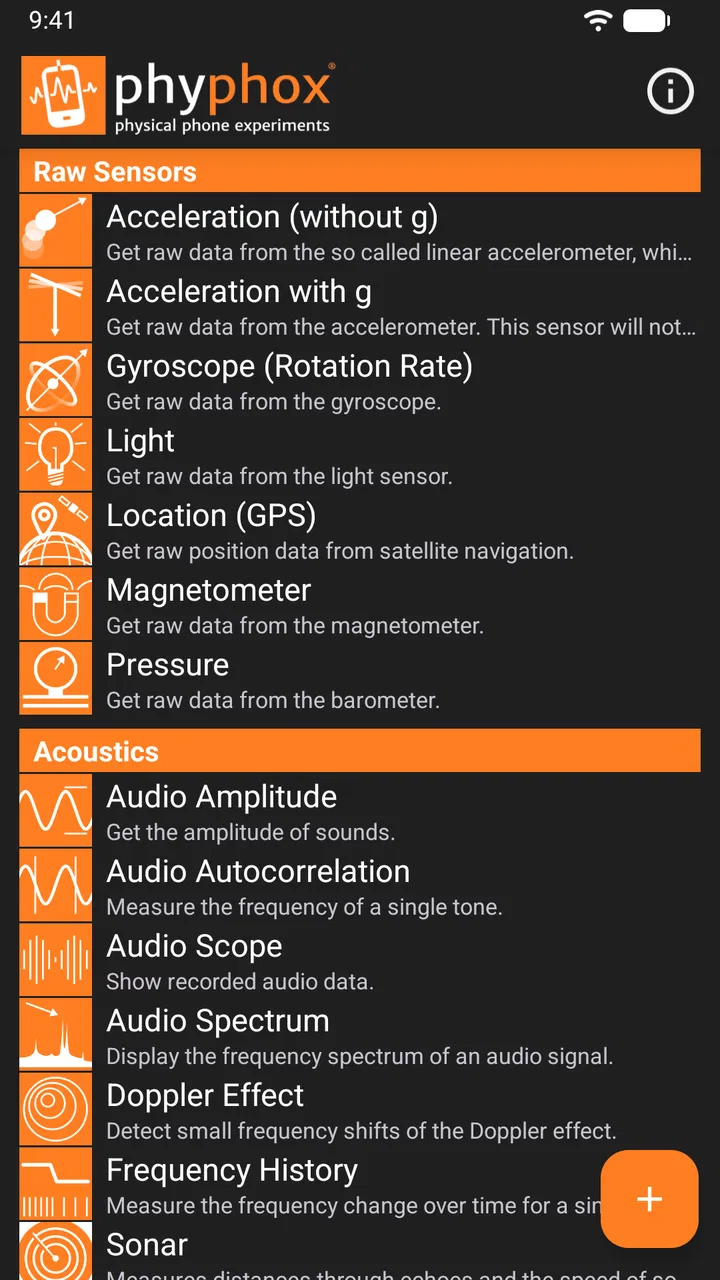
Phyphox is a versatile app designed for both Android and iOS that transforms your smartphone into a scientific measurement device. It utilizes your phone’s sensors to conduct experiments in physics, making it ideal for students, educators, and hobbyists. Whether you're measuring acceleration, sound frequency, or magnetic fields, phyphox provides an accessible platform for learning and exploration.
02How user-friendly is phyphox for beginners?
Phyphox is designed with an intuitive interface that caters to both beginners and experienced users. The app offers pre-configured experiments with step-by-step instructions, making it easy for novices to get started. Additionally, the app provides detailed explanations of each experiment, ensuring users understand the scientific principles behind their measurements.
03Does phyphox require internet access to function?
Phyphox can operate offline, allowing users to perform experiments without internet connectivity. However, an internet connection is beneficial for accessing additional resources such as detailed experiment guides, updates, and community forums where users can share insights and ask questions. This makes it flexible for use in various environments.
04Are there any in-app purchases or advertisements in phyphox?
Phyphox is a free app with no in-app purchases or advertisements, making it an excellent choice for educational purposes. The developers aim to provide an uninterrupted and focused learning experience. The app is supported by grants and donations, ensuring its continued development and maintenance without cost to the user.
05What are the device requirements and compatibility for phyphox?
Phyphox is compatible with most modern Android and iOS devices. It requires access to various smartphone sensors such as accelerometers, gyroscopes, and microphones. Users should ensure their device supports these features for optimal performance. Regular updates enhance compatibility and introduce new functionalities tailored to the latest smartphone technologies.
Pros
- User-friendly interface for beginners.
- Offers a wide range of sensor experiments.
- Data export options in multiple formats.
- Interactive tutorials enhance learning.
- Compatible with both Android and iOS.
Cons
- Limited functionality on older devices.
- Requires external sensors for some features.
- No offline mode for certain experiments.
- Occasional bugs in data visualization.
- Lacks advanced data analysis tools.

phyphox
Gallery